Two servers can have the same amount of RAM and behave differently because of how that memory is distributed across the processor’s memory channels. A configuration using one DIMM per channel (1DPC) may run memory at a higher transfer rate and leave room for expansion, while two DIMMs per channel (2DPC) can provide substantially more capacity but may reduce the supported memory speed.
The right choice is therefore not simply “fewer DIMMs for performance” or “more DIMMs for capacity.” It depends on the processor, server platform, required capacity, number of memory channels, DIMM density, workload sensitivity to bandwidth, and expected upgrade path.
- 1DPC vs 2DPC: the decision in brief
- What 1DPC and 2DPC actually mean
- First priority: populate memory channels correctly
- Why 2DPC can reduce memory speed
- Memory speed and memory bandwidth are not the same thing
- Example: 512 GB does not describe the configuration
- When 1DPC is usually the better choice
- Bandwidth-sensitive workloads
- Servers expected to grow
- Configurations where predictability matters
- When 2DPC makes sense
- You need more capacity than practical 1DPC DIMMs provide
- Lower-density DIMMs produce better purchase economics
- Capacity is more valuable than maximum bandwidth
- Do not confuse 2DPC with dual-channel memory
- Dual-socket servers add another constraint
- Plan the upgrade before buying the initial configuration
- Common 1DPC and 2DPC buying mistakes
- Buying by total capacity alone
- Assuming rated DIMM speed equals operating speed
- Filling the second DIMM slot before all channels
- Assuming every server supports 2DPC
- Ignoring the second CPU
- How to choose between 1DPC and 2DPC
- Practical recommendations by scenario
- The purchasing rule that matters
1DPC vs 2DPC: the decision in brief
| Criterion | 1DPC | 2DPC |
|---|---|---|
| DIMMs per populated channel | 1 | 2 |
| Maximum capacity | Lower for the same DIMM density | Higher |
| Supported memory speed | Often higher | May be lower, depending on platform |
| Memory channels available | Can use all channels | Can use all channels |
| DIMMs required for a given capacity | Fewer, usually higher-capacity modules | More, potentially lower-capacity modules |
| Future slot expansion | Better if the second slot on each channel remains free | Limited once both slots are populated |
| Best fit | Bandwidth-sensitive workloads and planned expansion | High memory capacity when 1DPC cannot meet the requirement economically or technically |
Default buying rule: if the required capacity fits economically at 1DPC while populating all relevant memory channels, start there. Move to 2DPC when capacity requirements or DIMM economics justify using the second slot on each channel.
That rule is only a starting point. The server manufacturer’s population table should decide the final configuration because supported transfer rates and valid DIMM combinations vary by CPU generation, processor SKU, DIMM type, rank, and system design.
What 1DPC and 2DPC actually mean
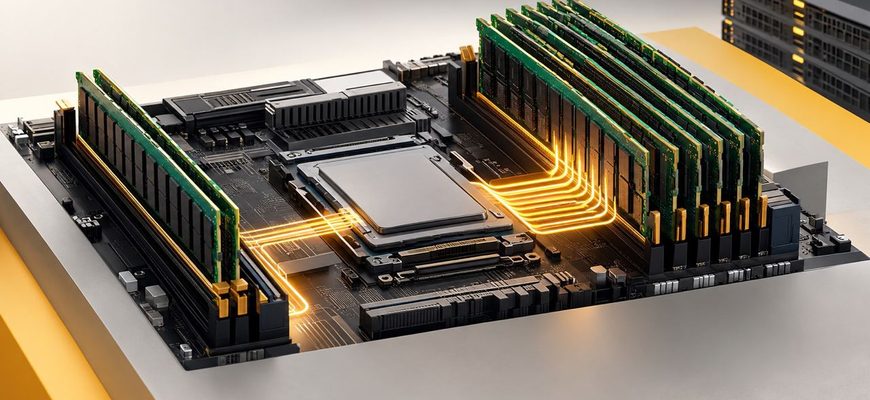
DPC means DIMMs per channel. Modern server processors contain multiple memory channels, and a server motherboard may expose one or two DIMM slots on each channel.
With 1DPC, one DIMM is installed on a populated memory channel. With 2DPC, two DIMMs share that channel.
This distinction matters because memory channels—not individual DIMMs—are the processor’s paths to system memory. Installing additional DIMMs on a channel increases available capacity, but it does not create another memory channel.
Consider a processor with eight memory channels and two DIMM slots per channel. Eight correctly placed DIMMs can produce an 8-channel 1DPC configuration. Installing another eight DIMMs creates an 8-channel 2DPC configuration: capacity increases, but the processor still has eight memory channels.
This is why DIMM count alone is a poor way to judge memory performance.
First priority: populate memory channels correctly
Before comparing 1DPC with 2DPC, make sure the configuration uses the processor’s available memory channels effectively.
For example, if a CPU exposes eight memory channels, eight DIMMs distributed one per channel are fundamentally different from eight DIMMs concentrated into four channels at 2DPC. The total DIMM count is identical, but the latter configuration leaves half of the memory channels unused.
AMD’s EPYC 9004 population guidance illustrates the principle directly: its recommended twelve-channel configuration uses twelve DIMMs at 1DPC and identifies that arrangement as providing full memory-bandwidth performance. AMD’s memory population recommendations provide the platform-specific slot order and supported configurations.
For buyers, the practical rule is simple: populate the available channels before adding a second DIMM to already populated channels, unless the server vendor explicitly specifies a different population scheme.
Why 2DPC can reduce memory speed
Adding a second DIMM to a memory channel increases the electrical load on that channel. Depending on the CPU, DIMM construction, memory generation, and motherboard design, the platform may support a lower maximum transfer rate at 2DPC than at 1DPC.
This is not theoretical. Current server documentation shows substantial platform-specific differences.
For example, Dell documents some PowerEdge configurations with DDR5 RDIMMs operating at up to 6400 MT/s at 1DPC and up to 5200 MT/s at 2DPC. Other platforms have different limits. The PowerEdge XE7740 memory specification, for example, lists 6400 MT/s at 1DPC and 5200 MT/s at 2DPC.
Lenovo documents another set of limits for the ThinkSystem SR630 V3 with 5th Gen Intel Xeon processors: conventional RDIMMs can operate at up to 5600 MT/s at 1DPC, while standard 2DPC configurations are listed at up to 4400 MT/s, with some memory options supporting different limits. See the ThinkSystem SR630 V3 product guide.
These figures should not be generalized into a universal 1DPC-to-2DPC penalty. They demonstrate why the exact server configuration must be checked before purchasing memory.
Memory speed and memory bandwidth are not the same thing
A common procurement mistake is to compare configurations using only the MT/s figure printed on the DIMM.
Memory bandwidth also depends on how many memory channels are active. A lower transfer rate across all available channels can provide more useful aggregate bandwidth than a faster transfer rate across only a subset of channels.
That leads to an important ordering of priorities when configuring a conventional bandwidth-sensitive server:
- Determine the required memory capacity.
- Use the processor’s memory channels effectively.
- Check the supported transfer rate for the resulting DIMM population.
- Only then compare alternative DIMM densities and 1DPC/2DPC layouts.
A configuration should not sacrifice several memory channels merely to preserve a higher headline DIMM speed.
Example: 512 GB does not describe the configuration
Suppose a hypothetical eight-channel server needs 512 GB of RAM and supports both 32 GB and 64 GB RDIMMs.
| Configuration | Capacity | Channel population | Expansion position |
|---|---|---|---|
| 8 × 64 GB | 512 GB | 8 channels at 1DPC | Second DIMM position remains available |
| 16 × 32 GB | 512 GB | 8 channels at 2DPC | All DIMM positions occupied |
Both configurations provide 512 GB and use all eight channels. But they are not equivalent.
The 8 × 64 GB option may support a higher memory transfer rate on platforms that downclock at 2DPC. It also leaves the second slot on every channel available for expansion. The 16 × 32 GB option may have a lower acquisition cost depending on current DIMM pricing, but future expansion could require replacing modules rather than simply adding them.
This is where purchase price and lifecycle cost diverge.
When 1DPC is usually the better choice
Bandwidth-sensitive workloads
Prefer 1DPC when the application is sensitive to memory bandwidth and the required capacity can be reached without using the second DIMM position. Examples can include scientific computing, simulation, analytics, in-memory processing, and some database workloads.
The important qualifier is workload behavior. A higher supported memory transfer rate does not guarantee an equivalent improvement in application performance. CPU utilization, cache behavior, storage, accelerators, NUMA placement, and software design can all become the limiting factor.
Servers expected to grow
1DPC is also attractive when memory requirements are expected to increase during the server’s service life.
Buying higher-capacity DIMMs initially can cost more per module, but it preserves empty slots. If an 8 × 64 GB configuration can later become 16 × 64 GB by adding matching modules, the upgrade may be simpler than replacing sixteen smaller DIMMs in a fully populated system.
Configurations where predictability matters
Fewer DIMMs also simplify configuration planning. There are fewer modules to source and fewer populated slots, and it can be easier to maintain a symmetrical memory layout across sockets.
This does not make 1DPC inherently more reliable. Server reliability depends on the platform and memory technology, not simply DIMM count. The benefit here is configuration simplicity.
When 2DPC makes sense
You need more capacity than practical 1DPC DIMMs provide
Capacity is the clearest reason to choose 2DPC. Modern processors can address very large memory footprints, and filling both DIMM positions per channel may be necessary to reach them.
AMD, for example, lists fifth-generation EPYC 9005 processors with 12 DDR5 channels and maximum system memory capacity figures based on 2DPC configurations. AMD’s EPYC 9005 specifications show how high-capacity platform limits can depend on using both DIMM positions.
Lower-density DIMMs produce better purchase economics
Sometimes two smaller DIMMs cost less than one module with twice the capacity. If the workload is not strongly memory-bandwidth-sensitive, the savings can justify 2DPC.
Do not compare DIMM prices alone. Include the effect on memory speed, power consumption, future expansion, and the cost of replacing smaller modules later.
Capacity is more valuable than maximum bandwidth
A virtualization host may benefit more from enough RAM to support its intended VM density than from preserving the maximum memory transfer rate. The same can apply to large databases, caching systems, and other capacity-driven workloads.
If insufficient RAM causes swapping, constrains VM density, or prevents the working set from remaining in memory, protecting a higher MT/s number is unlikely to be the right priority.
Do not confuse 2DPC with dual-channel memory
The terminology is easy to mix up.
2DPC means two DIMMs installed on one memory channel. It does not mean two memory channels.
A server processor with eight channels can operate with eight channels populated at 1DPC or eight channels populated at 2DPC. In the second configuration there are twice as many DIMMs, but not twice as many channels.
For server procurement, think in three separate numbers: memory channels per CPU, DIMM slots per channel, and DIMM capacity.
Dual-socket servers add another constraint
In a two-socket system, memory belongs to the processor connected to it. That makes balanced population across sockets important for general-purpose configurations.
A server with plenty of total RAM can still have an undesirable topology if most of that memory is attached to one CPU. Accessing memory associated with another NUMA node can have different latency and bandwidth characteristics than accessing local memory.
Unless a workload or vendor configuration specifically calls for an asymmetric design, plan memory per socket rather than treating the server as one undifferentiated pool of DIMM slots.
For example, a 1 TB dual-socket requirement should begin with the question “how should 512 GB be configured around each CPU?” rather than “which slots can hold 1 TB?”
Plan the upgrade before buying the initial configuration
The cheapest day-one configuration can become expensive if the server is likely to need substantially more RAM.
Consider three questions before selecting DIMM density:
- What memory capacity does the server need at deployment?
- What is the realistic capacity requirement in two or three years?
- Can the future capacity be reached by adding DIMMs, or will existing modules have to be replaced?
Suppose a server starts at 512 GB but is likely to require 1 TB. If both 8 × 64 GB and 16 × 32 GB are supported, the first configuration preserves a straightforward expansion path. The second consumes all available slots immediately. Moving from 512 GB to 1 TB may therefore require replacing the existing 32 GB DIMMs.
The cheaper initial BOM can become the more expensive lifecycle configuration.
Common 1DPC and 2DPC buying mistakes
Buying by total capacity alone
“512 GB RAM” is not a complete server memory specification. A purchase request should define DIMM count and capacity, memory type, population per CPU, and preferably the expected operating transfer rate.
Assuming rated DIMM speed equals operating speed
A DIMM rated for 6400 MT/s does not guarantee that the server will operate it at 6400 MT/s. CPU limits, DIMM population, module characteristics, and platform firmware rules determine the actual supported speed.
Filling the second DIMM slot before all channels
This can leave available memory channels unused. Follow the server manufacturer’s slot population order rather than installing DIMMs according to physical proximity or slot numbering alone.
Assuming every server supports 2DPC
Some server designs expose only one DIMM socket per channel. Dell’s PowerEdge R760xd2, for example, has eight memory channels and one memory socket per channel for each processor. In such a system, 2DPC is not an available upgrade strategy. See the R760xd2 system memory guidelines.
Ignoring the second CPU
For dual-socket servers, verify the DIMM layout for each processor independently. A valid DIMM count does not automatically mean a balanced NUMA configuration.
How to choose between 1DPC and 2DPC
Use this sequence when specifying a server:
- Choose the CPU and exact server platform. Memory-channel count and population rules are platform properties.
- Define required capacity per socket. Do this before choosing individual DIMMs.
- Populate the available channels. Avoid unnecessarily concentrating memory into fewer channels.
- Check the OEM population table. Confirm valid DIMM types, ranks, capacities, slot order, and supported speed at 1DPC and 2DPC.
- Compare DIMM densities. Determine whether the target capacity can be reached at 1DPC.
- Price the complete configurations. Compare 8 × 64 GB against 16 × 32 GB, for example, rather than comparing the price of one 64 GB DIMM with one 32 GB DIMM.
- Model the next upgrade. Calculate what happens when memory capacity must double.
- Consider workload sensitivity. Give more weight to the 1DPC operating-speed advantage when the workload is demonstrably bandwidth-sensitive.
Practical recommendations by scenario
| Scenario | Starting preference | Reason |
|---|---|---|
| Bandwidth-sensitive compute | 1DPC | Preserves the highest supported memory speed on many platforms |
| General-purpose application server | 1DPC | Good balance of performance and upgrade flexibility |
| Virtualization host with high RAM demand | Capacity-dependent | 2DPC may be justified when VM density requires more memory |
| Large in-memory database | Capacity-dependent | Required working-set capacity may outweigh the 1DPC speed advantage |
| Server expected to receive a major RAM upgrade | 1DPC | Preserves DIMM slots for expansion |
| Maximum-memory configuration | 2DPC where supported | Both DIMM positions may be required to reach platform capacity limits |
The purchasing rule that matters
Do not choose 1DPC or 2DPC in isolation. Choose a complete memory topology.
For most servers that can meet their capacity requirement with one DIMM per channel, a balanced 1DPC configuration is the strongest starting point: populate the processor’s available memory channels, preserve the platform’s higher supported memory speed where applicable, and retain empty slots for expansion.
Choose 2DPC when the additional capacity is necessary or when the economics of lower-density DIMMs outweigh the potential reduction in operating speed and loss of expansion slots.
Most importantly, verify the exact CPU-and-server combination before ordering. “DDR5-6400” on a DIMM specification is not the same as 6400 MT/s in the final server. The OEM memory population table—not the DIMM label—determines the configuration you are actually buying.