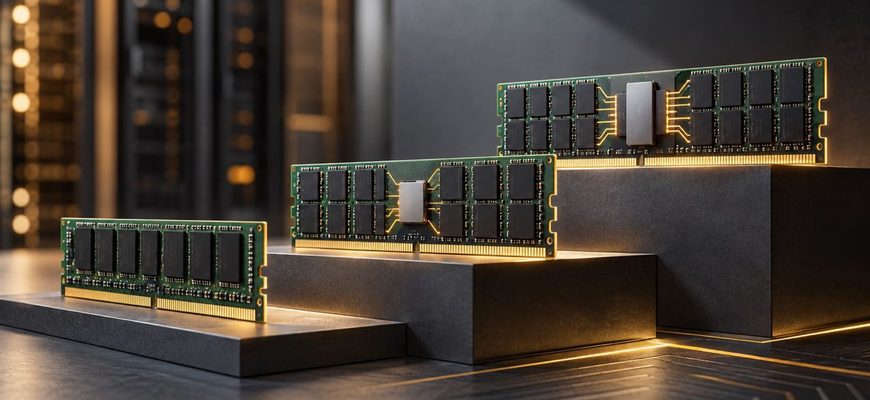
Choosing server memory is not simply a matter of buying the largest ECC DIMMs that fit the budget. ECC UDIMM, RDIMM, and LRDIMM use different electrical architectures, target different platform classes, and impose different limits on capacity and memory population. More importantly, they are not interchangeable upgrades.
For most buyers, the decision is straightforward once the server platform and required memory capacity are known: ECC UDIMM is primarily for entry-level servers and workstations that explicitly support unbuffered ECC memory; RDIMM is the mainstream choice for scalable server platforms; LRDIMM is mainly relevant to older DDR4 platforms where very high capacity or rank density requires it. On current DDR5 enterprise platforms, high-capacity registered memory has largely changed the purchasing landscape, so buyers should not assume that an older RDIMM-versus-LRDIMM rule still applies.
- The short answer
- First decide what the platform supports
- What ECC UDIMM is good at
- Choose ECC UDIMM when:
- Why RDIMM is the default for mainstream servers
- Choose RDIMM when:
- Where LRDIMM fits
- Choose LRDIMM when:
- UDIMM vs RDIMM vs LRDIMM: the purchasing trade-offs
- Capacity is not the only specification that matters
- Memory channels
- DIMMs per channel
- Ranks and module construction
- Do not buy RAM without an upgrade plan
- DDR4 and DDR5 make the labels easy to misread
- Common buying mistakes
- What should you choose?
The short answer
| Memory type | Best fit | Main advantage | Main limitation |
|---|---|---|---|
| ECC UDIMM | Entry servers and ECC-capable workstations | Simple, relatively inexpensive configuration | Lower capacity and scalability |
| RDIMM | Mainstream and high-end servers | Strong balance of capacity, scalability, and performance | Requires a platform designed for registered memory |
| LRDIMM | Compatible high-capacity DDR4 servers | Reduces electrical loading at high rank counts | Platform-specific and less relevant to current DDR5 purchasing |
If you are configuring a current general-purpose enterprise server, start with RDIMM unless the platform documentation says otherwise. If you are buying a small single-socket server whose CPU and motherboard specify ECC UDIMM, use ECC UDIMM. Treat LRDIMM as a platform-specific capacity option rather than a universally superior form of server memory.
First decide what the platform supports
The most important specification is not DIMM speed or capacity. It is the memory type supported by the CPU and motherboard.
ECC describes error-correction capability; it does not mean that every ECC module is interchangeable. An ECC UDIMM remains an unbuffered DIMM, while an RDIMM adds a register between the memory controller and parts of the DIMM. LRDIMM goes further by reducing the electrical load presented by the module to the memory controller.
Server platforms are designed around particular DIMM architectures. For example, Intel documents ECC UDIMM support for the Xeon 6 6300-series platform, while its Xeon W-2500 and W-3500 platforms support ECC RDIMMs and 3DS RDIMMs rather than ECC UDIMMs. Current AMD EPYC platforms likewise center their conventional server-memory configurations on RDIMMs. Platform class therefore determines much of the decision before individual DIMMs are compared.
Do not buy memory based on the assumption that a DIMM that physically resembles another DIMM will work. Check the CPU specification, server technical manual, supported-memory list, and population rules for the exact system.
What ECC UDIMM is good at
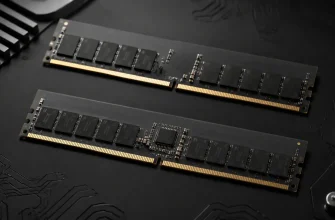
UDIMM means unbuffered DIMM. With a UDIMM, the memory controller communicates more directly with the module rather than using the register found on an RDIMM. ECC UDIMMs add error correction while retaining this unbuffered architecture.
The practical advantage is simplicity. ECC UDIMM is well suited to systems that need server-style memory protection but do not need the capacity or DIMM population of a larger enterprise server.
Choose ECC UDIMM when:
- the CPU and motherboard explicitly require or support ECC UDIMM;
- you are building an entry-level server, appliance, tower server, or ECC workstation;
- the required RAM capacity comfortably fits within the platform’s UDIMM limit;
- memory expansion over the system’s life is modest; and
- lower platform and memory cost matters more than maximum capacity.
A common purchasing mistake is treating ECC UDIMM as a cheaper substitute for RDIMM in a larger server. It is not. A server designed for RDIMMs may not support UDIMMs at all, even though both products are marketed as ECC memory.
Why RDIMM is the default for mainstream servers
RDIMM means registered DIMM. The register buffers command and address signals between the CPU’s memory controller and the DRAM devices. This reduces the electrical loading seen by the memory controller and makes larger, more heavily populated memory configurations practical.
That scalability is why RDIMM became the mainstream memory architecture for enterprise servers. It is a particularly natural fit for virtualization hosts, database servers, compute nodes, and other machines where memory capacity can reach hundreds of gigabytes or several terabytes.
Choose RDIMM when:
- the server platform is designed around registered memory;
- you need substantially more memory than an entry-level platform provides;
- future RAM expansion is likely;
- you need to populate many memory channels;
- memory bandwidth matters enough to justify careful channel population; or
- you are buying a modern general-purpose enterprise server.
The important point is that RDIMM should not be viewed simply as “faster RAM.” Its primary purchasing advantage is scalability and electrical manageability. Actual application performance depends on the CPU’s memory controllers, channel count, DIMM population, transfer rate, workload behavior, and NUMA topology.
Where LRDIMM fits
LRDIMM means load-reduced DIMM. Its buffering architecture reduces the electrical load that the memory controller sees from the memory ranks. This historically allowed compatible server platforms to support high-capacity and high-rank configurations that would have been difficult to achieve with conventional RDIMMs.
This made LRDIMM particularly useful in the DDR4 era for memory-dense virtualization hosts, in-memory databases, and other applications where maximizing RAM per socket mattered more than minimizing DIMM cost.
For example, older AMD EPYC documentation listed both RDIMM and LRDIMM as supported DIMM types, while Intel server documentation for compatible Xeon platforms similarly included both types. Those same platform documents also illustrate an important rule: RDIMM and LRDIMM generally cannot simply be mixed to create an arbitrary memory configuration.
Choose LRDIMM when:
- you are configuring or upgrading a server that explicitly supports LRDIMM;
- the required capacity or rank configuration calls for LRDIMM according to the platform vendor;
- you are maintaining a DDR4 system already standardized on LRDIMMs; or
- maximum supported capacity is more important than minimizing memory cost.
Do not automatically specify LRDIMM for a new server merely because it sounds like the highest tier. Modern DDR5 platforms have changed the available module technologies and capacity options. The correct high-capacity DIMM for a new server may be an RDIMM or 3DS RDIMM rather than an LRDIMM.
UDIMM vs RDIMM vs LRDIMM: the purchasing trade-offs
| Criterion | ECC UDIMM | RDIMM | LRDIMM |
|---|---|---|---|
| Typical platform | Entry server/workstation | Mainstream enterprise server | Compatible high-capacity server |
| Signal buffering | Unbuffered | Registered command/address path | Additional load reduction |
| Capacity scalability | Lowest of the three | High | Historically optimized for very high density |
| Cost | Usually the lowest-cost class | Higher | Typically a premium option where required |
| Best purchasing reason | Enough capacity at minimum complexity | Balanced server scalability | Reach a platform-specific high-capacity configuration |
| Current new-server relevance | Entry platforms | Very high | Primarily platform/generation dependent |
Capacity is not the only specification that matters
Once the correct DIMM type has been established, buyers should size the memory subsystem as a whole rather than compare individual modules in isolation.
Memory channels
A server CPU has multiple memory channels, and bandwidth depends heavily on how those channels are populated. Buying fewer, very large DIMMs can provide the required capacity while leaving channels unused. For a bandwidth-sensitive workload, that can be a worse configuration than using more appropriately sized modules across more channels.
AMD’s current EPYC memory guidance explicitly notes that workloads such as HPC can benefit from the additional bandwidth available when more memory channels are populated. This is why “512 GB of RAM” is not a complete server specification: eight 64 GB DIMMs and four 128 GB DIMMs can present different bandwidth characteristics on a platform with more than four available channels.
DIMMs per channel
Check whether the intended configuration uses one DIMM per channel (1DPC) or two (2DPC). Adding a second DIMM to a channel increases capacity, but depending on the CPU, DIMM type, and server design, it can affect supported memory speed and latency.
AMD, for example, documents current EPYC platforms capable of up to two DIMMs per channel while noting that OEM implementations vary and that 1DPC can offer lower latency while 2DPC is useful for maximum capacity. Intel likewise documents platforms where maximum memory speed is associated with 1DPC configurations.
Ranks and module construction
Two DIMMs with the same capacity and nominal transfer rate are not necessarily equivalent. Rank count and DRAM organization affect the configuration that a platform can support. Procurement should therefore use the server vendor’s qualified memory list or exact module specifications rather than treating capacity and DDR generation as sufficient compatibility information.
Do not buy RAM without an upgrade plan
Memory sizing should include the expected configuration two or three years after purchase, not just day-one requirements.
Suppose a server needs 256 GB now but is expected to reach 512 GB. Filling every available slot with small DIMMs may minimize initial module cost but make the eventual upgrade expensive because existing modules have to be removed. Conversely, buying a tiny number of oversized DIMMs can leave memory channels unpopulated and sacrifice bandwidth.
The better configuration usually balances three requirements: enough channels populated for the workload, enough free slots for a plausible upgrade, and DIMM capacities that will remain useful after that upgrade.
This is one reason RDIMM is attractive for mainstream server purchases. It gives buyers a wider path toward high capacity without forcing the system into the constraints of an entry-level memory architecture.
DDR4 and DDR5 make the labels easy to misread
Do not treat UDIMM, RDIMM, and LRDIMM as a timeless ladder from basic to premium. The market changes between DDR generations.
DDR4-era servers commonly exposed purchasing choices between RDIMM and LRDIMM at higher capacities. Current DDR5 enterprise systems are much more heavily centered on RDIMM-based technologies, while newer high-bandwidth options are also appearing on specific platforms. Intel Xeon 6, for example, includes platforms with MRDIMM support in addition to conventional DDR5 RDIMMs.
DDR generation is itself a hard compatibility boundary. DDR4 modules from older EPYC or Xeon systems cannot simply be inserted into DDR5 sockets in newer servers. A server refresh should therefore treat RAM reuse as a compatibility question, not as an assumed source of savings.
Common buying mistakes
- Buying “ECC RAM” without checking the DIMM type. ECC UDIMM and ECC RDIMM are not interchangeable merely because both provide ECC.
- Assuming LRDIMM is automatically better than RDIMM. It solves a particular capacity and electrical-loading problem and must be supported by the platform.
- Optimizing only for total gigabytes. Channel population can be as important as capacity for bandwidth-sensitive applications.
- Filling every slot on day one with small DIMMs. This can make later expansion unnecessarily expensive.
- Assuming the DIMM’s advertised speed is the system speed. CPU support, rank configuration, DPC, BIOS rules, and server qualification determine the operating rate.
- Mixing module types without checking the manual. Some server platforms explicitly prohibit mixing RDIMM and LRDIMM and may refuse to initialize memory in an unsupported configuration.
- Buying before checking the qualified-parts list. Matching DDR generation, capacity, and speed does not guarantee that a particular module is validated for the server.
What should you choose?
Choose ECC UDIMM when you are buying an entry-level server or workstation that explicitly supports it and its capacity ceiling leaves comfortable headroom. There is little reason to move to a more expensive server platform solely to obtain RDIMM if the workload will remain well inside the smaller system’s memory limits.
Choose RDIMM for most mainstream server purchases. It is the practical default for current scalable server platforms and offers the strongest balance of capacity, bandwidth-oriented population options, availability, and future expansion.
Choose LRDIMM when a compatible platform specifically uses it to reach the capacity you require, particularly when expanding or maintaining DDR4-era systems. Do not make LRDIMM a requirement for a new server until you have checked what memory architecture the current CPU generation actually supports.
Finally, choose the server and its memory subsystem together. Start with workload capacity and bandwidth requirements, map those requirements onto the CPU’s memory channels, decide how much expansion headroom is necessary, and only then select individual DIMMs. In server procurement, the right memory architecture matters more than finding the DIMM with the most impressive standalone specification.