OCP NIC 3.0 vs PCIe add-in cards is a choice between adapter implementations, not between different host buses: an OCP NIC also uses PCIe. Prefer a qualified OCP adapter when its dedicated position preserves expansion slots your configuration needs. Choose a PCIe add-in card when it provides the required supported features and fits the complete server more economically. An empty opening or a matching port speed is insufficient evidence that either option will work.
The purchasing decision depends on the exact server, risers, processors, adapter part number, and expansion plan. Compare configurations that deliver the same network service and retain the same required upgrade capacity.
- OCP NIC 3.0 vs PCIe cards: define what you are buying
- Count usable positions in the ordered configuration
- A slot-budget example changes the cheaper choice
- Match host bandwidth and features before comparing speed
- External access does not establish hot-swap support
- Price a supported network connection, not just a card
- Choose by the configuration that must exist after purchase
- Put these confirmations in the order
OCP NIC 3.0 vs PCIe cards: define what you are buying
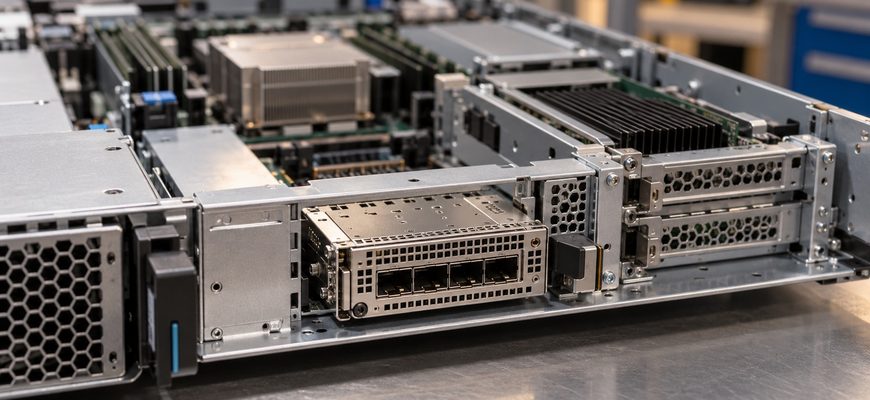
In this comparison, “PCIe card” means a conventional network add-in card installed in a standard expansion slot. OCP NIC 3.0 defines a different module implementation, with its own mechanical and platform interfaces. It does not replace PCIe as the host connection or identify an Ethernet speed.
The OCP NIC 3.0 specification, version 1.6.0 includes multiple mechanical variants. A server documented for OCP 3.0 SFF should therefore be evaluated against that implementation and its supported adapters, rather than every product carrying an OCP label.
A practical starting point is the same controller family offered in both formats. Lenovo’s Intel E810 adapter guide lists PCIe and OCP 3.0 options. Its two-port E810-DA2 options include PCIe part 4XC7A08295 and OCP part 4XC7A08294. Separate ordering identities matter even when the controller family and advertised network speeds match.
| Buying criterion | OCP NIC 3.0 module | Conventional PCIe NIC |
|---|---|---|
| Installation position | Requires the supported OCP module position and implementation. | Requires a suitable expansion slot, riser, and bracket. |
| Expansion budget | Can preserve a conventional slot for another device. | Uses a conventional slot that must be included in the device map. |
| Performance qualification | Check controller, host link, firmware, and workload. | Check the same requirements; the bracket format establishes no speed advantage. |
| Service access | Verify the server’s actual access and replacement procedure. | Verify chassis access and the slot’s replacement procedure. |
| Support and reuse | Confirm exact module and server qualification. | Confirm qualification on each intended server; physical fit alone is insufficient. |
Count usable positions in the ordered configuration
Request a device map that includes the network adapter, GPUs, storage controllers, NVMe connectivity, and planned additions. Record mechanical clearance, electrical link width and generation, CPU attachment, and any required riser or cable kit. Count positions that remain usable with the selected storage and cooling configuration.
Lenovo’s ThinkSystem SR650 V3 product guide illustrates why a platform maximum is insufficient. Slot availability depends on risers and drive bays, and some positions require both processors. The documented rear OCP position has a PCIe 5.0 x16 host interface, while the front implementation uses PCIe 4.0 x16. Only one OCP adapter can be installed; the front and rear locations are alternatives.
Those details describe that server, not a universal OCP rule. Another platform can expose different positions and connectivity. Preserving an expansion opening does not create additional PCIe lanes or guarantee that every future device can use it.
If processor population affects the slot map, include that dependency in the purchase comparison. The single-socket versus dual-socket server comparison addresses the wider cost and capacity consequences of adding another CPU.
A slot-budget example changes the cheaper choice
Illustrative scenario: a proposed server has three usable conventional single-slot positions and a separate qualified OCP position. The configuration needs one single-slot accelerator, one HBA, dual-port 25GbE networking, and one reserved conventional position for a future device. Assume the supplier has confirmed the required electrical connectivity, clearance, power, and cooling for all intended devices.
| Allocation | Networking in OCP position | Networking in PCIe position |
|---|---|---|
| Accelerator and HBA | 2 conventional positions used | 2 conventional positions used |
| Network adapter | Separate OCP position used | 1 additional conventional position used |
| Conventional positions remaining | 3 − 2 = 1 | 3 − 2 − 1 = 0 |
| Required growth position | Retained under the stated assumptions | Not retained; revise the configuration |
The PCIe NIC could have a lower unit price and still produce an ineligible quotation because the configuration fails the expansion requirement. Price a supported revision before comparing totals. It might require different risers or a different platform; availability and cost must come from the supplier.
If the future position is unnecessary, the result changes. A qualified PCIe NIC that meets the network requirement may be the better purchase. Reserve capacity has value when it supports a credible roadmap, not simply because an empty slot looks reassuring.
Match host bandwidth and features before comparing speed
Compare port count, link speeds, supported media, PCIe connectivity, driver and firmware support, and the features the application actually uses. Include simultaneous traffic across all required ports rather than testing one link in isolation. Neither format establishes lower latency or higher throughput by itself.
The E810 guide provides a useful host-link example: its four-port E810-DA4 requires an x16 position in PCIe Gen3 servers to avoid a PCIe bandwidth limitation, whereas the guide allows x8 or x16 in Gen4 servers without that limitation. Apply the rule to the documented adapter and platform rather than treating all four-port NICs alike.
Require evidence for virtualization features, RDMA, offloads, or timestamping if they affect the purchase. Specify the OS or hypervisor and required release. A feature listed for a controller family does not establish that the selected card, firmware, driver, and application combination is qualified.
External access does not establish hot-swap support
The OCP NIC 3.0 version 1.6.0 specification makes hot-swap support optional for baseboard implementers. It also distinguishes the hardware elements from the overall hardware and software architecture needed to support replacement. A visible handle or tool-less retention mechanism is therefore insufficient authorization to remove a powered adapter.
Ask for the exact server service procedure and supported replacement conditions. Determine whether chassis extraction, a shutdown, or a maintenance interruption is required. Apply the same scrutiny to PCIe cards. Serviceability should be a documented purchasing criterion rather than an inference from the photograph.
Cooling also belongs in the approved configuration. Verify the adapter’s thermal requirements, supported fan configuration, and interaction with neighboring devices. If expansion constraints are driving the chassis choice, use the 1U versus 2U server comparison to evaluate the complete enclosure.
Price a supported network connection, not just a card
Compare quotes for the same port count, network service, software requirements, support term, and future expansion allowance. Include the NIC, risers or other mandatory server options, approved cables or transceivers, and spare-part requirements. The E810 guide, for example, states that its adapters ship without SFP28 transceivers or direct-attach cables.
Check management integration separately. The SR650 V3 guide describes optional sharing of an OCP network port with its management controller. If that function matters, request confirmation for the exact adapter and firmware combination. Do not assume every OCP module provides the same management behavior.
For fleet purchases, document the replacement SKU for each server family and the supported firmware baseline. Common controller branding can simplify comparison, but it does not establish physical or support interchangeability. Include qualification and spare inventory in lifecycle cost rather than assuming either format is always cheaper to maintain.
Choose by the configuration that must exist after purchase
- Expansion-constrained GPU or storage server: start with a supported OCP option when it preserves a conventional position needed by the confirmed device plan.
- Existing server with suitable available PCIe capacity: prefer the qualified add-in card if it meets the requirements at lower complete cost and preserves the required roadmap.
- Mixed server fleet: choose supported adapter variants and replacement parts for each platform; validate any proposed common spare.
- Service-access constraint: select the documented access and replacement arrangement the site can accommodate, including any required interruption.
Put these confirmations in the order
- Exact hardware: server model, processor population, storage configuration, risers, adapter part number, bracket or OCP variant, and required option kits.
- Device map: installation position, electrical connection, CPU attachment, clearance, and remaining usable expansion capacity.
- Network qualification: ports, speeds, media, required features, and supported OS, driver, and firmware combination.
- Thermal and service requirements: validated cooling, access method, replacement conditions, and support coverage.
- Acceptance evidence: delivered configuration and representative workload results against agreed throughput, latency, and stability criteria.
Buying recommendation: choose the qualified OCP NIC when its dedicated placement solves an actual expansion or supported integration requirement. Choose the qualified PCIe add-in card when the complete server meets the same requirements more economically. Resolve OCP NIC 3.0 vs PCIe card selection with an approved device map and complete quotation, rather than port speed, a free opening, or a controller name alone.