Rack servers and tower servers can use the same CPUs, RAM and storage, but they suit very different environments. The real decision is not which chassis is more powerful. It is where the server will live, how much infrastructure you expect to add, and how easily the system can be maintained as the business grows.
- ⚖️ Rack vs Tower Servers at a Glance
- 🧩 The Fundamental Difference Is the Environment
- ⚙️ 1. Performance: Form Factor Does Not Decide CPU Speed
- 🧠 2. Expansion: One Flexible Chassis vs a Repeatable Platform
- 💾 3. Storage Capacity and Drive Access
- 🔌 4. Cooling, Noise and Physical Location
- 📈 5. Scaling and Operations
- 💰 6. Cost: Compare the Whole Deployment
- 🎯 Which Form Factor Fits Your Workload?
- 🚦 Choose a Tower Server If…
- 🏗️ Choose a Rack Server If…
- 🚫 Five Buying Mistakes to Avoid
- 1. Buying a rack server for an open office
- 2. Buying a tower server because it is cheaper today
- 3. Ignoring the rack itself
- 4. Treating form factor as a performance specification
- 5. Forgetting service access
- ✅ Procurement Checklist
- 🏆 Final Verdict
⚖️ Rack vs Tower Servers at a Glance
| Factor | Rack server | Tower server |
|---|---|---|
| Best for | Data centres, server rooms and growing infrastructure | Small offices, branch locations and standalone deployments |
| Installation | Mounted in a standard 19-inch rack | Stands on the floor, desk or shelf |
| Density | Very high | Low |
| Noise | Usually high | Usually lower |
| Scaling | Excellent for multiple systems | Good for one or two systems |
| Initial setup cost | Higher if a rack is not already available | Lower for a single-server deployment |
🧩 The Fundamental Difference Is the Environment
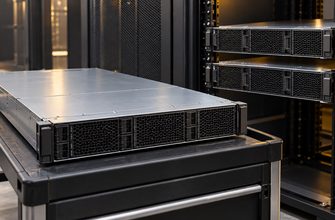
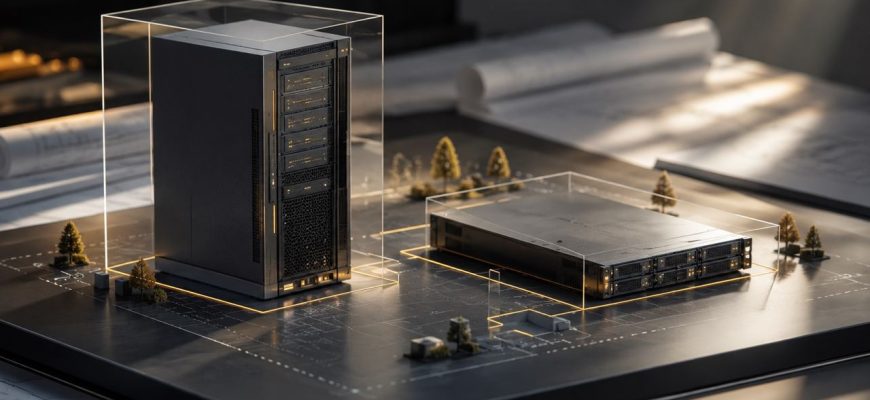
A rack server is designed to slide into a standard equipment rack. Its height is measured in rack units: 1U, 2U and 4U are the most common sizes. A 1U server is compact and dense, while a 2U or 4U system normally provides more drive bays, PCIe slots and cooling capacity.
A tower server looks more like a large workstation. It stands independently and does not require a rack, rails or a dedicated data-centre cabinet.
Neither design is automatically better. A single tower server can be the right choice for a small office with a file server, domain controller or local application. A rack server becomes more practical once the business needs several servers, network switches, UPS systems, shared storage or structured cabling.
⚙️ 1. Performance: Form Factor Does Not Decide CPU Speed
Do not assume that a rack server is always faster. Both rack and tower systems can support enterprise CPUs, ECC memory, RAID controllers, NVMe storage and redundant power supplies.
A well-configured tower server may outperform a low-end rack server. The processor, memory configuration, storage design and workload matter far more than the chassis orientation.
- 1U rack servers are space-efficient but have tighter thermal limits.
- 2U rack servers are often the best balance for virtualisation, databases and general infrastructure.
- 4U rack servers offer more room for GPUs, storage devices and PCIe cards.
- Tower servers can be very capable, but do not provide the same density as multiple rack systems.
🧠 2. Expansion: One Flexible Chassis vs a Repeatable Platform
A tower server can be surprisingly expandable. Many models accept additional RAM, multiple internal drives and several PCIe cards. For one machine, this may be all the flexibility an organisation needs.
The limitation appears when infrastructure grows. Adding a second and third tower server means finding more floor space, more power outlets and more room for cables. A rack creates a repeatable platform: every server, switch, UPS and patch panel has a defined place.
Choose a tower server if you expect one primary system and perhaps one backup device. Choose a rack server if you expect to add hosts, shared storage, networking equipment or GPU infrastructure over time.
💾 3. Storage Capacity and Drive Access
Both tower and rack servers can support substantial storage, but their design priorities differ.
Tower servers are often excellent for internal storage in small deployments. They may offer several 3.5-inch drive bays, which makes them attractive for file sharing, backup repositories or local archives.
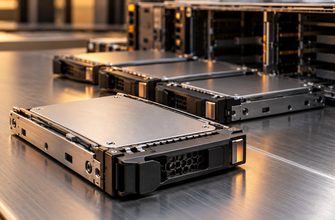
Rack servers are stronger when storage needs to be standardised, serviced quickly or expanded across several systems. Front-access drive bays make replacement easier in a server room. A 2U or 4U chassis can offer a large number of hot-swap bays while keeping every system in the same rack.
Before ordering, confirm:
- whether the server supports 2.5-inch, 3.5-inch or NVMe bays;
- which backplane is installed;
- whether the RAID or HBA controller supports the required drives;
- how many drives can operate at full performance;
- whether failed drives can be replaced without shutting down the server.
🔌 4. Cooling, Noise and Physical Location
This is one of the clearest differences between the two form factors.
Rack servers use high-speed fans designed for dense, front-to-back airflow. They are effective in an equipment room but can be uncomfortably loud in an office. A 1U server is especially likely to produce noticeable fan noise under load.
Tower servers usually run more quietly because they have more internal volume and larger fans. This makes them easier to place in a small office, retail location or branch where there is no dedicated server room.
A quieter tower server is still a server. It needs stable power, ventilation, dust protection and physical security. Avoid closed cupboards, radiators and publicly accessible spaces.
📈 5. Scaling and Operations
A tower server is simple to deploy once. A rack server is simple to operate repeatedly.
With a rack, network ports face the same direction, cabling can be labelled, power can be delivered through managed PDUs and UPS hardware can protect multiple devices. Maintenance, replacement and inventory become easier as the environment grows.
- One to two servers: a tower is often the simplest and most economical choice.
- Three or more infrastructure devices: begin planning for a rack.
- Virtualisation cluster, colocation or regular expansion: choose rack servers from the start.
💰 6. Cost: Compare the Whole Deployment
A tower server often has the lower initial cost because it does not require rack rails, a cabinet, cable management, rack-mounted UPS hardware or dedicated cooling.
But compare the full environment, not only the server price. A rack deployment may cost more on day one, yet save time and reduce disorder as hardware grows.
- Server chassis and configuration
- Rack, rails and shelves
- UPS and power distribution
- Network switches and patch panels
- Cooling and ventilation
- Installation and future expansion
- Support contracts and spare drives
🎯 Which Form Factor Fits Your Workload?
🚦 Choose a Tower Server If…
- You need one primary server in an office or branch.
- A dedicated server room is unavailable.
- Quiet operation matters.
- The workload is file sharing, identity services, backup or a modest application stack.
- You want to minimise initial infrastructure spending.
- Near-term expansion is unlikely.
🏗️ Choose a Rack Server If…
- You already have a rack or data-centre space.
- You need multiple servers, switches or shared storage.
- You plan to build a virtualisation cluster.
- Hot-swap storage, high PCIe density or GPU expansion matter.
- Structured cabling and easier maintenance are priorities.
- You expect infrastructure growth over several years.
🚫 Five Buying Mistakes to Avoid
1. Buying a rack server for an open office
A rack server can be technically ideal and operationally unbearable. Check the acoustic profile and install it in a suitable room.
2. Buying a tower server because it is cheaper today
If the business will soon add networking, backup appliances and more compute, the initial savings can disappear into a messy and difficult-to-maintain setup.
3. Ignoring the rack itself
A rack needs enough depth, weight capacity, airflow, power and cable-routing space. Measure before ordering hardware.
4. Treating form factor as a performance specification
Compare CPU generation, core count, memory channels, RAID or HBA options, network ports and NVMe support. “Rack” and “tower” do not tell you how fast a server will be.
5. Forgetting service access
Confirm how drives, power supplies and expansion cards are replaced. A server that is difficult to service can create more downtime than a slightly more expensive chassis.
✅ Procurement Checklist
- Where will the server physically live?
- Is there a dedicated, ventilated and secure equipment area?
- How many servers and network devices are expected within three years?
- Is office noise acceptable?
- How many drive bays are needed now and later?
- Do you need hot-swap storage or redundant power supplies?
- Will you add GPUs, high-speed networking or additional PCIe cards?
- Is a UPS required, and where will it be installed?
- Who will physically service the hardware?
- Can the chosen form factor scale without a costly redesign?
🏆 Final Verdict
Choose a tower server when you need a capable, quieter and simpler standalone system. It is the natural choice for a small office, branch site or business with a clear one-server requirement.
Choose a rack server when infrastructure is growing, uptime matters and multiple systems need to work as one organised environment. The rack is not just furniture; it becomes the foundation for power, cooling, cabling, maintenance and future expansion.
The right answer is the form factor that fits the operational reality of your next three to five years—not simply the lowest initial price or the most impressive-looking chassis.