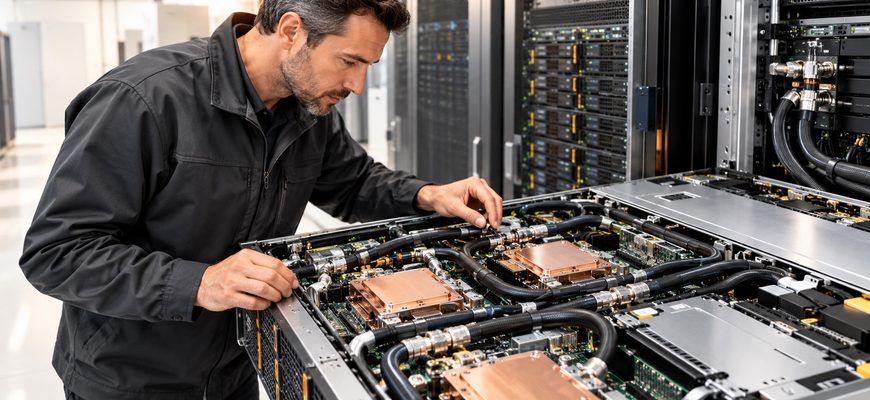
Comparing air-cooled vs liquid-cooled servers starts with an uncomfortable fact: the more advanced cooling system is not necessarily the better purchase.
Direct-to-chip liquid cooling can make demanding processor and accelerator configurations practical, increase usable compute density, and reduce the heat released into a data center’s air. It can also introduce facility modifications, coolant distribution equipment, and maintenance obligations that an air-cooled deployment would avoid.
The expensive mistakes happen when buyers compare cooling technologies without comparing the complete systems they will actually operate. Seven decisions determine whether liquid cooling earns its additional cost.
Choose air cooling when the required server configuration is validated for the intended environment, the facility has sufficient cooling headroom, and higher density would not deliver a meaningful financial benefit.
Choose direct-to-chip liquid cooling when it enables a necessary hardware configuration, removes a measurable thermal constraint, or reduces the complete cost of delivering the required computing capacity.
- Air-Cooled vs Liquid-Cooled Servers: The Purchasing Trade-Offs
- Mistake 1: Choosing the Cooling Method Before Validating the Hardware
- Mistake 2: Treating Available Rack Space as Available Compute Capacity
- Mistake 3: Pricing Liquid-Cooled Servers Without the Cooling Infrastructure
- Mistake 4: Assuming Liquid Cooling Eliminates Server Airflow
- Example: Calculating Residual Air-Side Heat
- Mistake 5: Assuming Better Cooling Automatically Means Better Performance
- Mistake 6: Comparing Cooling Savings Without Calculating Total Cost
- What Belongs in a Five-Year TCO Model?
- Mistake 7: Ignoring Cooling Redundancy, Serviceability, and Upgrade Limits
- Which Cooling Architecture Fits Your Workload?
- Start with air cooling
- Evaluate liquid cooling early
- Final Recommendation: Match Cooling to the Constraint
- Server Cooling Procurement Checklist
Air-Cooled vs Liquid-Cooled Servers: The Purchasing Trade-Offs
Air cooling moves component heat into the server’s airflow and ultimately into the facility’s air-handling system. Direct-to-chip liquid cooling transfers heat from selected components into a circulating liquid loop.
Both systems must reject the heat generated by the IT equipment. Their differences lie in how that heat moves, what infrastructure is needed, and which configurations they can support economically.
| Criterion | Air cooling | Direct liquid cooling | Buying implication |
|---|---|---|---|
| Initial integration | Uses conventional airflow and compatible facility cooling. | Requires a validated liquid distribution and heat-rejection path. | Air cooling usually involves fewer changes in an existing air-cooled facility. |
| High-power hardware | Limited by chassis airflow, heatsinks, inlet conditions, and manufacturer support. | Can support demanding components through approved cold-plate assemblies. | Check the exact hardware configuration, not cooling technology in isolation. |
| Rack density | May require spreading equipment across additional racks. | Can reduce air-side heat rejection and allow denser installations. | Density has value only when rack power and supporting infrastructure permit it. |
| Energy consumption | Includes server fans and facility air-cooling equipment. | May reduce fan demand but introduces pumping and liquid-loop equipment. | Compare complete electrical consumption, not fan power alone. |
| Maintenance | Familiar fans, heatsinks, and airflow service procedures. | Additional fluid, connection, monitoring, and servicing requirements. | Service capabilities can outweigh theoretical efficiency improvements. |
| Future upgrades | Limited by supported chassis and airflow configurations. | Limited by cold-plate compatibility, loop capacity, and system qualification. | Neither approach guarantees unrestricted hardware upgrades. |
The air-cooled vs liquid-cooled servers comparison becomes useful only when these differences are applied to a real bill of materials, an actual facility, and a defined workload.
Mistake 1: Choosing the Cooling Method Before Validating the Hardware
A cooling architecture should follow the processor, accelerator, memory, and chassis requirements. Reversing that sequence can eliminate suitable configurations before their performance or cost has been evaluated.
A CPU’s thermal design power or a GPU’s board-power rating does not establish whether a complete server can operate with air cooling. Airflow restrictions, component placement, fan configuration, and inlet temperature affect the result.
When evaluating air-cooled vs liquid-cooled servers, request the manufacturer’s supported configuration matrix. Confirm the actual processors, accelerators, expansion cards, and intended environmental conditions.
If the required system is fully supported by air cooling, a liquid-cooled alternative needs a separate economic or density justification. If the intended configuration requires liquid cooling, the question shifts to whether the facility can support it.
A liquid-cooled server is not automatically faster. If both architectures keep identical components within their validated operating conditions, cooling alone may deliver no meaningful improvement in application throughput.
Mistake 2: Treating Available Rack Space as Available Compute Capacity
A rack can have unused vertical space while already approaching its electrical or thermal limits. Installing another server is useful only if the infrastructure can power and cool it reliably.
Buyers comparing air-cooled vs liquid-cooled servers should evaluate usable compute capacity per rack, not the theoretical number of chassis that fit inside the enclosure.
Liquid cooling can allow more computing hardware to operate within a given physical footprint. That benefit disappears if electrical distribution, networking, floor loading, or heat-rejection infrastructure becomes the next constraint.
The same principle affects chassis selection. A compact server is not necessarily the most efficient way to purchase computing capacity. The 1U vs 2U server comparison examines the practical trade-offs between density, expansion, and thermal design.
Ask for validated rack-level power requirements, expected sustained electrical demand, heat rejection into air, and liquid-loop capacity where applicable.
There is no universal rack-power threshold at which every facility must abandon air cooling.
Mistake 3: Pricing Liquid-Cooled Servers Without the Cooling Infrastructure
A server fitted with cold plates is only one part of a direct-to-chip liquid-cooling deployment. The complete installation may require rack manifolds, coolant distribution units, heat exchangers, pumps, sensors, and compatible facility connections.
The Open Compute Project Cold Plate initiative addresses components and interfaces across the technology cooling system, from cold plates through coolant distribution units.
For air-cooled vs liquid-cooled servers, the purchase-price comparison is incomplete until the necessary supporting infrastructure has been included.
Compatibility also extends beyond physical connections. Coolant chemistry, temperature, pressure, flow rate, and wetted materials must meet the equipment manufacturer’s operating requirements.
A compatible-looking connector is not proof of system-level interoperability.
What is a coolant distribution unit?
A coolant distribution unit, or CDU, manages coolant circulation and heat transfer between the IT cooling loop and the broader cooling infrastructure. Depending on its design, it can contain pumps, heat exchangers, controls, and monitoring equipment.
CDU capacity, redundancy, and fluid compatibility should be evaluated as part of the complete deployment.
Can a liquid-cooled server use existing facility water?
Only when the complete cooling design supports the available conditions. Facility water and the coolant circulating through server cold plates may be separated by a heat exchanger.
Verify fluid quality, allowable temperatures, pressure, flow, and material compatibility before ordering equipment.
Mistake 4: Assuming Liquid Cooling Eliminates Server Airflow
Direct-to-chip cooling transfers heat from selected components into liquid. It does not necessarily cool every heat-producing part of the server.
Memory, storage devices, network adapters, power supplies, and voltage regulators may continue releasing heat into the surrounding air, depending on the equipment design.
This residual heat matters when evaluating air-cooled vs liquid-cooled servers for a dense rack installation. A liquid-cooled deployment can still require significant room-level airflow.
Example: Calculating Residual Air-Side Heat
Consider a hypothetical rack of ten servers. Assume each server consumes an average of 1.5 kW under a representative sustained workload.
Total rack IT power is therefore 15 kW. Suppose the proposed cooling configuration transfers 70% of the resulting heat into liquid.
Total IT heat: 15 kW
Heat transferred into liquid: 15 × 0.70 = 10.5 kW
Residual air-side heat: 15 × 0.30 = 4.5 kW
These values are illustrative assumptions, not measured results for a particular server. They show why liquid-loop capacity and remaining air-cooling requirements must be assessed together.
Request configuration-specific heat-capture information rather than applying a generic percentage to every liquid-cooled system.
Mistake 5: Assuming Better Cooling Automatically Means Better Performance
Liquid cooling can enable demanding hardware configurations and provide an effective thermal path for high-heat-flux components. Neither benefit automatically translates into faster application performance.
Consider two otherwise equivalent servers operating within their supported thermal conditions. If neither system is constrained by temperature, the liquid-cooled model may offer little practical advantage for the target workload.
The air-cooled vs liquid-cooled servers decision changes when cooling determines which processor or accelerator configuration can be installed, or whether a required configuration can operate as intended.
High-density GPU and HPC deployments deserve particular scrutiny because accelerator power, packaging, and sustained utilization can make heat removal a primary architectural constraint.
For these systems, compare delivered workload performance, not just component power ratings or theoretical cooling capacity.
Request workload throughput, sustained system power, required cooling conditions, and supported component configurations. Normalize the comparison to the same amount of useful computing work.
Mistake 6: Comparing Cooling Savings Without Calculating Total Cost
A lower fan-power requirement does not establish a lower operating cost. Liquid cooling introduces auxiliary equipment that also consumes electricity.
Pumps, coolant distribution equipment, facility heat rejection, and monitoring must be included in the comparison. The operating environment and cooling design determine the actual savings.
A meaningful air-cooled vs liquid-cooled servers TCO comparison should also account for the number of racks required to deliver the same computing capacity.
What Belongs in a Five-Year TCO Model?
| Cost category | Air-cooled deployment | Liquid-cooled deployment |
|---|---|---|
| Server acquisition | Complete validated air-cooled systems. | Complete validated liquid-cooled systems and cooling assemblies. |
| Facility integration | Airflow delivery, containment, and compatible heat rejection. | Liquid distribution, heat exchangers, manifolds, and required modifications. |
| Energy | IT equipment, fans, and facility cooling electricity. | IT equipment, remaining fans, pumps, and complete cooling-loop electricity. |
| Maintenance | Fans, thermal assemblies, and existing cooling-system service. | Fluid management, connectors, sensors, pumps, and specialist service. |
| Expansion | Additional racks, airflow, or cooling capacity where required. | Additional liquid-loop capacity, rack distribution, and compatible hardware. |
The useful comparison is total cost per required unit of delivered computing capacity, not cost per chassis.
Use representative average electrical loads for energy calculations. Maximum power ratings are relevant for infrastructure sizing, but multiplying them by every hour of ownership can distort operating-cost estimates.
Five-year TCO = Server acquisition + Facility integration + Energy + Maintenance + Space + Planned expansion
Decision metric: Compare total cost against the same required workload capacity.
When does higher rack density save money?
Higher density creates a financial advantage when it avoids costs such as additional racks, space, networking, or facility expansion.
That advantage must exceed the added cost of the denser cooling architecture. If rack space is abundant and expansion is inexpensive, the density benefit may have little financial value.
Mistake 7: Ignoring Cooling Redundancy, Serviceability, and Upgrade Limits
Liquid cooling changes the system’s failure domains. In addition to conventional server components, the deployment may depend on pumps, fluid connections, sensors, and shared cooling distribution equipment.
This does not make liquid-cooled servers inherently less reliable. Reliability depends on component quality, redundancy, monitoring, installation, and maintenance.
The Lenovo Neptune direct water-cooling documentation discusses cooling-system design considerations including redundancy, fluid requirements, and monitoring.
Before comparing air-cooled vs liquid-cooled servers on reliability, establish how each proposed system responds to a cooling failure and how quickly service can restore the required capacity.
Future hardware upgrades also require attention. An air-cooled chassis may reach its airflow limits; a liquid-cooled platform may require different cold plates or additional loop capacity.
Require documented procedures for cooling failures, component replacement, and planned upgrades. Confirm who supplies replacement parts and who is responsible for the liquid-cooling infrastructure.
Which Cooling Architecture Fits Your Workload?
The right choice depends on hardware requirements, sustained utilization, facility readiness, and the economics of deployment density.
The following scenarios are starting points for evaluating air-cooled vs liquid-cooled servers, not universal configuration rules.
| Workload | Starting recommendation | When to reconsider |
|---|---|---|
| Application servers | Air cooling. | Required configurations exceed validated air-cooling capacity. |
| Enterprise virtualization | Air cooling. | Consolidation targets create substantial rack-level thermal constraints. |
| Database infrastructure | Air cooling. | Dense, sustained high-power configurations justify liquid cooling. |
| GPU training clusters | Evaluate direct liquid cooling early. | An approved air-cooled system delivers the required performance and density at lower total cost. |
| HPC clusters | Compare complete architectures. | Facility integration costs outweigh cooling and density benefits. |
| Small edge installations | Air cooling. | Specialized validated equipment requires liquid cooling and suitable local support exists. |
Start with air cooling
For supported virtualization, application, and database systems, conventional air cooling is a sensible baseline. Pay for liquid cooling only when it removes a real constraint or produces a demonstrable economic benefit.
Evaluate liquid cooling early
Dense GPU and HPC systems can make thermal capability a central buying criterion. Compare manufacturer-approved configurations, facility integration costs, and delivered workload performance before selecting the architecture.
Final Recommendation: Match Cooling to the Constraint
Air cooling remains a strong purchasing choice for server configurations that meet their performance targets within validated thermal conditions. Its established infrastructure and familiar maintenance requirements can keep both acquisition and operating costs under control.
Direct-to-chip liquid cooling becomes attractive when it enables otherwise impractical hardware, improves usable compute density, or creates savings that outweigh its additional infrastructure requirements.
The strongest air-cooled vs liquid-cooled servers buying decision is therefore based on complete supported systems, not the apparent sophistication of their cooling methods.
Buy liquid cooling when it solves a measured problem. Otherwise, keep the simpler architecture.
Server Cooling Procurement Checklist
Use this checklist before approving a server configuration or requesting final quotations.
- Define the workload, sustained utilization, and required application performance.
- Confirm manufacturer-supported CPU, accelerator, memory, and chassis configurations.
- Document expected and maximum electrical demand at server and rack levels.
- Verify available facility airflow, cooling capacity, and heat rejection.
- For liquid-cooled equipment, confirm CDU capacity, coolant requirements, pressure, flow, and connection compatibility.
- Calculate residual air-side heat using configuration-specific information.
- Compare sustained workload performance under representative operating conditions.
- Model five-year acquisition, integration, energy, maintenance, and expansion costs.
- Verify cooling redundancy, failure procedures, monitoring, and support coverage.
- Evaluate likely future hardware upgrades against the cooling infrastructure’s remaining capacity.
- Compare the complete cost of delivering the required computing capacity.
If both air-cooled and liquid-cooled configurations deliver the required workload performance, calculate whether higher density, energy savings, or avoided facility expansion justify the liquid cooling premium.
If the answer cannot be demonstrated with a supported configuration and a transparent cost model, the upgrade case remains unproven.
Methodology: This comparison evaluates physical server cooling architectures from a procurement perspective. Numerical heat-balance examples are illustrative calculations rather than benchmark or field-test results. Actual equipment capabilities must be established using manufacturer documentation.