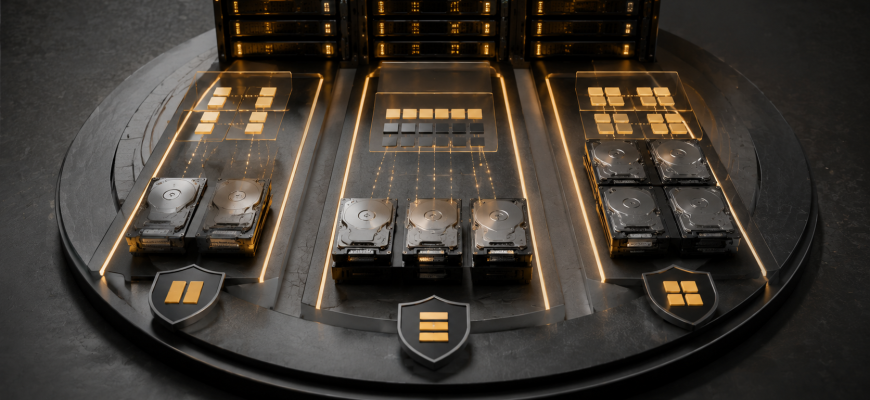
RAID 1, RAID 5, and RAID 10 can all protect a server from a drive failure, but they make very different compromises to get there. RAID 1 prioritizes simplicity. RAID 5 prioritizes usable capacity. RAID 10 prioritizes performance and straightforward redundancy at the cost of more raw storage.
The right choice depends less on which RAID level looks best on a specification sheet and more on how your server reads, writes, grows, and recovers when a drive fails.
Choose RAID 1 for simple two-drive servers where predictable redundancy matters more than maximizing capacity.
Choose RAID 5 when usable capacity is a priority, the workload is relatively read-heavy, and you accept parity overhead and more demanding rebuild behavior.
Choose RAID 10 for write-heavy databases, virtualization, and performance-sensitive production servers where sacrificing 50% of raw capacity is acceptable.
- ⚖️ RAID 1 vs RAID 5 vs RAID 10 at a Glance
- 🧩 First: What Are You Actually Buying With RAID?
- 🪞 RAID 1: Simple, Predictable Mirroring
- 🧮 RAID 5: More Capacity, More Compromise
- Where RAID 5 makes more sense
- Where to be cautious
- ⚡ RAID 10: Performance Without Parity
- 💾 Capacity: How Much Storage Are You Willing to Sacrifice?
- 🔥 Write Performance: The Critical RAID 5 Question
- 🛠️ Rebuilds Matter More Than the Normal State
- 🎯 RAID Choice by Server Workload
- 💰 Cost: Calculate Price per Usable TB
- 🚦 Choose RAID 1 If…
- 📦 Choose RAID 5 If…
- ⚡ Choose RAID 10 If…
- 🚫 Six RAID Buying Mistakes
- 1. Treating RAID as a Backup
- 2. Choosing RAID Only by Usable Capacity
- 3. Ignoring Rebuild Conditions
- 4. Assuming RAID 10 Always Survives Any Two Drive Failures
- 5. Mixing Drive Capacity Without Planning
- 6. Ignoring the Workload
- ✅ 10-Point RAID Buying Checklist
- 🏆 Final Verdict
⚖️ RAID 1 vs RAID 5 vs RAID 10 at a Glance
🧩 First: What Are You Actually Buying With RAID?
RAID combines multiple physical drives into a storage layout designed to achieve some combination of redundancy, capacity, and performance.
Those goals compete with each other. Increasing redundancy consumes storage capacity. Maximizing usable capacity can introduce parity overhead. Increasing performance may require more drives.
There is no universally “best RAID.” There is only a RAID layout whose compromises match your workload better than the alternatives.
And one distinction matters before any comparison:
RAID can keep a system operating after certain drive failures. It does not protect you from accidental deletion, corrupted data, malware, application errors, theft, fire, or the loss of the entire server. A production storage design still needs an independent backup strategy.
🪞 RAID 1: Simple, Predictable Mirroring
RAID 1 stores mirrored copies of data across drives. In the common two-drive configuration, the same data is written to both devices.
That makes the capacity calculation extremely simple: two equal-capacity drives provide roughly the usable capacity of one.
- Simple architecture.
- Only two drives are required.
- No distributed parity calculation.
- Straightforward capacity planning.
- Good fit for smaller servers.
- Half of the raw capacity is consumed by mirroring.
- Capacity scaling is less efficient than parity RAID.
- It does not provide the aggregate performance potential of larger arrays.
RAID 1 is especially attractive when the storage requirement is modest. A server that only needs two drives may gain little from introducing a more complicated parity array.
🧮 RAID 5: More Capacity, More Compromise
RAID 5 stripes data and distributed parity across at least three drives. The array can continue operating after the failure of one drive.
Its major attraction is capacity efficiency. With N equal-capacity drives, usable capacity is approximately the capacity of N−1 drives.
Four equal 4 TB drives in RAID 5 provide approximately 12 TB of raw array capacity before filesystem and formatting overhead, while RAID 10 with the same four drives provides approximately 8 TB.
That capacity advantage is significant when storage cost per usable terabyte matters.
But parity is not free. Small writes can require reading existing data and parity information, calculating new parity, and writing updated information. Actual behavior depends on the controller, software implementation, cache, drives, workload, and access pattern.
Where RAID 5 makes more sense
- Capacity efficiency matters.
- The workload is predominantly read-oriented.
- Write intensity is moderate.
- The array is appropriately sized.
- Rebuild behavior has been considered.
Where to be cautious
- Write-heavy databases.
- Heavy random-write workloads.
- Latency-sensitive applications.
- Arrays where degraded operation or rebuild time creates unacceptable risk.
⚡ RAID 10: Performance Without Parity
RAID 10 combines mirroring and striping. Data is mirrored for redundancy and striped across mirror sets for performance.
The price of that architecture is easy to see: roughly half of the raw drive capacity becomes usable storage.
With four 4 TB drives, for example, RAID 10 provides approximately 8 TB before filesystem and formatting overhead.
That may look inefficient beside RAID 5. But capacity is only one part of the purchase.
If write latency and predictable storage performance matter more than squeezing maximum capacity from every drive, RAID 10 deserves serious consideration.
Because RAID 10 does not use parity, it avoids the parity write behavior associated with RAID 5. This makes it an attractive starting point for transactional and write-intensive workloads.
💾 Capacity: How Much Storage Are You Willing to Sacrifice?
Capacity efficiency is where the three options diverge most visibly.
These figures illustrate nominal RAID capacity using equal-sized drives. Filesystem, metadata, provisioning, manufacturer capacity conventions, and implementation details affect the space visible to the operating system.
For capacity-heavy storage, RAID 5 therefore looks attractive. For performance-sensitive storage, the additional drives required by RAID 10 may be an acceptable cost.
🔥 Write Performance: The Critical RAID 5 Question
Sequential read throughput alone should not decide a server storage architecture.
Databases, virtual machines, mail systems, application servers, and many other workloads can generate frequent small random writes. Those patterns make the RAID write path important.
Simple mirrored writes. A strong option when two drives provide enough capacity.
Parity can add work to the write path, making workload pattern and implementation especially important.
Avoids parity and is often the strongest starting point of these three for sustained write-heavy workloads.
🛠️ Rebuilds Matter More Than the Normal State
A storage array should not be evaluated only while every drive is healthy.
When a drive fails, the array enters a degraded state and must eventually restore redundancy. That recovery process consumes storage resources and can affect application performance.
Drive capacity, media type, controller or software implementation, workload intensity, array width, and storage performance all influence rebuild behavior.
Designing RAID around normal benchmark performance while ignoring degraded operation. Ask what happens to latency, throughput, redundancy, and application availability while the array is rebuilding.
RAID 5 deserves particular attention because the array tolerates one drive failure. Until redundancy is restored, another drive failure can cause loss of the array.
RAID 10 has a different failure model. Whether multiple simultaneous drive failures are survivable depends on which members of the mirror sets fail. It should therefore not be summarized as simply “RAID 10 survives two failures.”
🎯 RAID Choice by Server Workload
These are starting points rather than universal prescriptions. Application I/O patterns, drive technology, controllers, software RAID implementation, backup requirements, and availability targets can change the answer.
💰 Cost: Calculate Price per Usable TB
Comparing the price of individual drives is not enough. Compare the cost of the complete array against the capacity you can actually use.
Suppose a workload requires roughly 8 TB of usable storage. Depending on the drive sizes selected, that requirement might be satisfied by a two-drive RAID 1 configuration, a three-drive RAID 5 configuration, or a four-drive RAID 10 configuration.
But the cheapest array per usable terabyte is not automatically the cheapest system to operate.
Also consider:
- required IOPS;
- write latency;
- drive endurance;
- controller requirements;
- hot-spare strategy;
- backup storage;
- downtime tolerance;
- rebuild behavior;
- future capacity growth.
Optimize for cost per usable workload, not cost per usable terabyte. Storage that is cheap but cannot meet the application’s latency or recovery requirements is not actually economical.
🚦 Choose RAID 1 If…
- You need a simple two-drive redundant configuration.
- The server has modest capacity requirements.
- You want to avoid parity complexity.
- You are building a boot or system volume.
- You value predictable architecture over maximum capacity efficiency.
📦 Choose RAID 5 If…
- Usable capacity is a major purchasing criterion.
- Your workload is primarily read-heavy.
- Write intensity is moderate.
- Single-drive fault tolerance meets the availability design.
- You have evaluated degraded-state and rebuild behavior.
- The capacity savings justify the parity trade-offs.
⚡ Choose RAID 10 If…
- The workload performs frequent random writes.
- Storage latency matters.
- You are running production databases or virtualization.
- You can accept approximately 50% usable capacity.
- You want redundancy without parity.
- Performance matters more than maximizing capacity per drive.
🚫 Six RAID Buying Mistakes
1. Treating RAID as a Backup
Redundancy and backup solve different problems. Design them separately.
2. Choosing RAID Only by Usable Capacity
RAID 5 may look attractive on a capacity spreadsheet while being a poor match for a write-intensive workload.
3. Ignoring Rebuild Conditions
Understand how the server behaves after a drive failure, not just while every drive is healthy.
4. Assuming RAID 10 Always Survives Any Two Drive Failures
It does not. Multiple failures may be survivable when they occur in different mirror sets; losing both members of the same mirror set can make the array unavailable.
5. Mixing Drive Capacity Without Planning
RAID layouts commonly base usable capacity on the smallest participating drive. Verify the behavior of your specific implementation before purchasing mixed-capacity media.
6. Ignoring the Workload
Sequential file storage, VM hosting, and transactional databases can place radically different demands on the same drives.
✅ 10-Point RAID Buying Checklist
- How much usable capacity does the server require?
- What percentage of I/O is read versus write?
- Is the workload sequential, random, or mixed?
- How sensitive is the application to storage latency?
- How many drive failures must the design tolerate?
- What happens to performance while the array is degraded?
- How will failed drives be replaced?
- Does the server need a hot spare?
- How quickly will storage requirements grow?
- Where is the independent backup stored?
🏆 Final Verdict
RAID 1, RAID 5, and RAID 10 optimize for different priorities.
RAID 1 is the simplicity choice. It works particularly well for small servers and system volumes where two drives provide enough capacity.
RAID 5 is the capacity-efficiency choice. It can make sense for read-oriented workloads where parity overhead and rebuild considerations are acceptable.
RAID 10 is the performance-oriented choice. It is often the strongest starting point of these three for databases, virtualization, and write-heavy production storage when the 50% capacity cost is acceptable.
Do not select RAID from the drive count alone. Start with usable capacity, I/O pattern, latency target, failure tolerance, and recovery requirements—then calculate what each layout will cost to satisfy them.
RAID 1 for simplicity. RAID 5 for capacity efficiency. RAID 10 for performance-sensitive redundancy. The right answer is the one that still meets your workload requirements when a drive has failed—not merely when the array is healthy.