Choosing between a VPS and a dedicated server is not simply a question of which one is faster. The right answer depends on your workload, growth plans, storage requirements, budget, and how much control you actually need.
A small application may gain nothing from owning an entire physical machine. A busy database, virtualization host, or sustained compute workload may eventually become uncomfortable inside a virtual environment.
Choose a VPS if flexibility, a lower starting cost, and easy resource scaling matter most.
Choose a dedicated server if you need sustained performance, large memory or storage configurations, predictable resources, or direct hardware control.
- ⚖️ VPS vs Dedicated Server at a Glance
- 🧩 The Fundamental Difference
- ⚙️ 1. CPU: Bursts vs Sustained Performance
- 🧠 2. RAM: Small Differences Can Change the Economics
- 💾 3. Storage: NVMe Alone Does Not Answer the Question
- 📈 4. Scaling: VPS Has a Structural Advantage
- 🔒 5. Isolation and Hardware Control
- 💰 6. Cost: Compare the Whole Configuration
- 🎯 Which One Fits Your Workload?
- 🚦 Choose a VPS If…
- 🏗️ Choose a Dedicated Server If…
- 🚫 Five Buying Mistakes to Avoid
- 1. “Dedicated is always faster”
- 2. Choosing a VPS only because it is cheaper
- 3. Buying for imaginary future growth
- 4. Ignoring storage behavior
- 5. Comparing only CPU core counts
- ✅ 10-Point Buying Checklist
- 🏆 Final Verdict
⚖️ VPS vs Dedicated Server at a Glance
🧩 The Fundamental Difference
A VPS is a virtual machine running on a physical host. A virtualization layer allocates CPU, memory, storage, and networking resources to multiple isolated virtual environments.
From inside the operating system, a VPS behaves much like an independent server. You can install software, configure services, manage users, and normally receive root or administrator access.
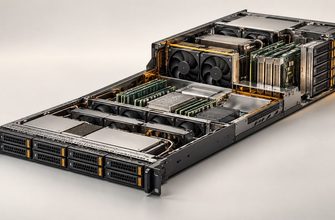
A dedicated server gives one environment access to the physical machine itself. CPU sockets, memory modules, local drives, network interfaces, and other installed hardware are not divided into separate customer virtual machines by the hosting model.
Do not start the decision with “Which one is more powerful?” Start with “Which resources does my workload consume continuously, and which does it need only occasionally?”
⚙️ 1. CPU: Bursts vs Sustained Performance
CPU behavior is one of the strongest signals when deciding between virtual and dedicated infrastructure.
- CPU demand is moderate.
- Traffic arrives in bursts.
- The application spends significant time below peak load.
- You want to increase resources as demand grows.
- CPU load remains high for long periods.
- Performance consistency is important.
- You run many virtual machines.
- Compute capacity can be planned in advance.
Websites, development environments, monitoring systems, and many business applications often have variable utilization. A correctly sized VPS can be highly efficient for them.
Large databases, continuous processing, virtualization hosts, video processing, and other CPU-heavy applications may benefit more from dedicated resources.
🧠 2. RAM: Small Differences Can Change the Economics
For modest memory requirements, virtualization is usually convenient. There is little reason to dedicate an entire physical machine to an application that only needs a small amount of RAM.
The calculation becomes more interesting as memory requirements increase.
Compare normal usage + peak usage + realistic growth. Do not buy infrastructure based only on today’s memory consumption — or on an unrealistic maximum you may never reach.
Large databases, in-memory applications, and virtualization platforms can require hundreds of gigabytes of RAM. At that point, compare the complete economics of a large virtual allocation with an appropriately configured physical server.
💾 3. Storage: NVMe Alone Does Not Answer the Question
Seeing “NVMe” on a specification sheet tells you very little about how the complete storage subsystem will behave.
Evaluate at least:
- usable storage capacity;
- latency;
- IOPS requirements;
- sequential throughput;
- drive endurance;
- redundancy;
- RAID requirements;
- backup strategy;
- whether underlying storage resources are shared.
The physical storage layer is largely abstracted. This is convenient when you care about usable capacity and delivered performance rather than individual drives.
You can potentially choose drives, RAID layout, controllers, and separate storage tiers for different workloads.
If storage architecture is a major part of the application’s performance model, dedicated hardware deserves much closer consideration.
📈 4. Scaling: VPS Has a Structural Advantage
Virtual infrastructure is designed around flexible resource allocation. Depending on the platform, increasing CPU, memory, or storage may require little more than changing the virtual machine configuration or service plan.
Physical servers have harder limits. Once you reach the platform’s practical CPU, RAM, storage, PCIe, or network capacity, additional vertical scaling can require hardware changes or migration.
| Scenario | Better Starting Point | Reason |
|---|---|---|
| New project with uncertain demand | VPS | Lower commitment and easier resizing |
| Frequent small capacity changes | VPS | Virtual resources are easier to adjust |
| Large stable workload | Dedicated | Capacity can be planned around known demand |
| Specialized hardware | Dedicated | Direct platform control |
🔒 5. Isolation and Hardware Control
A VPS gives you control over the virtual machine. The infrastructure provider controls the underlying physical host.
A dedicated server gives you substantially more control over the physical platform.
This becomes important when you need:
- a particular CPU model;
- specific physical drives;
- a custom RAID configuration;
- large memory capacity;
- particular network interfaces;
- GPU or other PCIe accelerators;
- low-level virtualization control.
💰 6. Cost: Compare the Whole Configuration
The monthly headline price is only one part of the decision.
Compare the complete system:
- CPU capacity;
- required RAM;
- storage capacity and performance;
- network requirements;
- backup capacity;
- redundancy requirements;
- management effort;
- expected growth;
- future migration requirements.
For a lightweight workload, paying for an entire physical machine can leave substantial capacity unused. Conversely, once a virtual machine becomes very large and consumes substantial resources continuously, it makes sense to compare its total cost with physical infrastructure.
Do not compare prices. Compare equivalent usable configurations. A cheap VPS and a powerful dedicated server are not competing products if they solve different workloads.
🎯 Which One Fits Your Workload?
These are starting points, not universal rules. Actual resource consumption matters more than the label attached to an application.
🚦 Choose a VPS If…
- Your CPU and memory requirements are moderate.
- You want a lower-cost starting point.
- Future demand is difficult to predict.
- You expect to resize resources.
- You do not require physical hardware control.
- You need to deploy additional environments quickly.
- Your workload has variable rather than continuous heavy utilization.
🏗️ Choose a Dedicated Server If…
- Your CPU utilization remains high for long periods.
- You need substantial memory capacity.
- Storage latency and throughput are critical.
- You require a specific disk or RAID layout.
- You need predictable physical resources.
- You require specialized hardware.
- You want to operate your own virtualization layer.
- Your workload is large and relatively stable.
🚫 Five Buying Mistakes to Avoid
1. “Dedicated is always faster”
It is not. A modern virtual machine can outperform an older or badly configured physical server. Compare actual resources and architecture.
2. Choosing a VPS only because it is cheaper
A low monthly price has little value if the application continuously hits CPU, memory, or storage limits.
3. Buying for imaginary future growth
Do not pay today for a workload that may never exist. Plan for realistic growth and understand your migration path.
4. Ignoring storage behavior
Two machines with similar CPU and RAM specifications can perform very differently when storage latency or throughput becomes the bottleneck.
5. Comparing only CPU core counts
Core count does not equal application performance. Architecture, frequency behavior, workload parallelism, and resource allocation also matter.
✅ 10-Point Buying Checklist
- How much CPU does the application normally consume?
- Is CPU demand sustained or bursty?
- How much RAM is actually used today?
- How much memory is realistically needed within the next year?
- How sensitive is the application to storage latency?
- Do you need a specific RAID configuration?
- What network throughput does the application require?
- Do you need control over physical hardware?
- How quickly could the workload grow?
- What is the migration plan if the server becomes too small?
🏆 Final Verdict
There is no universal winner between VPS and dedicated servers.
VPS wins on flexibility. It is usually the better starting point when requirements are moderate, variable, or difficult to predict.
Dedicated servers win on control and predictable capacity. They become compelling when workloads are large, sustained, storage-sensitive, or dependent on specific hardware.
The deciding question is therefore not “Which server type is better?” It is “Which architecture matches the resources my workload actually consumes?”
Start with the workload, not the server. Measure CPU, memory, storage, network demand, and expected growth first. Once those requirements are clear, the VPS-versus-dedicated decision becomes much easier.